
Connect the headset
You can open the app from two places:
Either way, the headset connects to port 8000 on the robot’s computer. That port is open while
axol teleop, axol collect-data, or a teleop or data collection operation from the control panel is running.
- Open the app in the Quest browser.
- Enter the robot computer’s address in Axol host address. Tap the field to pick one of the last five hosts you connected to.
- Press Connect.
- The first time, the connection fails because the certificate is self-signed. Tap Authorize certificate, accept the warning in the popup, and the app reconnects. You can also open
https://<host>:8000in the headset browser and accept the warning there. - Press Enter VR.
If Wi-Fi adds lag, tick Quest over USB before you connect. Controller poses then travel over a USB cable, and the cameras keep using the network. See Quest over USB.
Camera views
When camera video is on, the robot’s cameras appear as screens over passthrough. Camera video is on withaxol teleop --cameras, with axol collect-data, or when cameras are assigned in the control panel’s Cameras tab.
- The overhead camera is in the center. A stereo ZED X overhead camera shows in 3D.
- The left and right wrist cameras are in the bottom corners.
- Only the cameras being streamed appear.
- Connecting cameras… shows until every streamed camera has sent its first frame.
Controller bindings
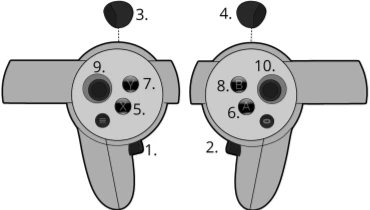
Engage and freeze the arms
- Press both grips together to start tracking.
- Click one grip to freeze that arm. It holds its pose and its grip, so it can steady an object while the other arm works. Click the grip again to resume.
- A reset, a contact stop or a dropped link disengages both arms. Press both grips to engage again.
--teleop.hold_to_engage true), each grip is a dead-man switch. Hold a grip to move its arm, and release it to freeze the arm. Either grip engages its own arm, including from rest. After a forced disengage, release a grip you are still holding before it engages again.
If the link drops
The arms disengage after about half a second and hold their position if the headset stops sending poses. This happens when you take the headset off, open the system menu, exit the app or lose Wi-Fi. Engaging again never jerks the arms toward the controllers (see Re-engaging). Press X to return them to rest.Teleop or data collection
The command that starts the session sets the mode. You can’t switch it in the headset.axol teleop: the HUD showsTeleopand A does nothing.axol collect-data: the HUD showsData collectionand A records. See Record episodes.
Re-engaging
When a grip engages an arm again, your controller and the arm are usually in different places. This happens after you freeze an arm, walk away, or someone moves the arm by hand. The Ramp button on the HUD chooses what happens:
In ramp mode the arm moves at about 0.15 m/s and takes at least 0.75 s. You can keep moving while it catches up. After a reset or a return to rest, the next engage behaves like clutch, so the arms never jump out of rest.
Set the startup default with the control panel’s Re-engage setting or
--teleop.reengage. During a session, use the Ramp button or Re-engage in session settings.
Box mode
Box mode needs the parcel gripper. Set Robot → Gripper to
parcel in the control panel, or pass --axol.gripper parcel. With the standard parallel gripper, box mode and its settings are hidden in the headset and the control panel.Turn box mode on
Use any of these:- The Box button on the HUD.
- Click both thumbsticks together.
- Box mode in session settings.
--teleop.box_mode true).
The pair engages as soon as box mode turns on, led by your right hand. Set Box lead hand to left to lead with the left hand. If someone turns box mode on from the control panel while nobody is wearing the headset, the pair waits for a grip.
On engage, the arms first move into a parallel pair over about 1.5 s. They keep their current midpoint and width. Then the leading hand moves the pair.
Box mode controls
Both thumbsticks do the same thing. They shape the grasp but never move the pair. A push counts only along its main direction, so widening the grip never moves the elbows.
To clamp a box, lead the pair to it. Then push a thumbstick left until the gripper faces close on the box’s sides. The width is the gap between the two contact faces, from 0.02 m to 0.70 m.
Grasps
Click either thumbstick while leading to switch. The arms move to the other grasp over about 1.5 s, and you can switch with a box already clamped. The Box button shows the current grasp, for example Box: ON (straight). Set the flush angle with Angled yaw and the starting grasp with
--teleop.box_grasp.
The parcel gripper
The parcel gripper has a fixed blade and a hinged plate. When you release the trigger, the plate opens fully and folds back along the wrist, on the side facing the box. Box mode places each gripper by this contact face, not by its mount. Each gripper turns whichever flat side is closer toward the box, so the wrist never makes a half turn. If a gripper engages with its fixed blade toward the box, or with its motor cap facing down, set Left face or Right face to+x or -x. Try the other value if the first is wrong, then engage again. If the pair doesn’t sit flat on the box, adjust Angled yaw or --teleop.box_grip_tilt.
Driving with the box
While a grip leads the pair, the thumbsticks shape the grasp and Jelly stays still. Freeze the pair to drive Jelly with the normal controls.- Clamp the box.
- Click the leading grip to freeze the pair. The arms hold the box where it is, with the grippers closed.
- Let go of both thumbsticks. The sticks start driving Jelly once both are released.
- Drive to where you need to go.
- Squeeze both triggers, then press a grip to lead the pair again.
Elbows
Push a thumbstick forward or back to set Elbows out. It goes from 0° (hanging below the line from shoulder to wrist) to 90° (level), and starts at 30°. Bring the elbows in to pass a doorway, or out for a wide box. The value is kept for the next engage. If closing the width would bring an arm too close to the torso, the width stops closing. To turn off elbow control, pass--teleop.box_elbow_weight 0. The elbows then rest where they fall, and forward or back on the stick does nothing.
Clamp force
The clamp gets harder the further you push the width past the box, by about 6 N per arm for each centimetre. These settings shape the squeeze. They work on the real robot only.
The wrists also limit the clamp to about 31 N per arm in a typical carrying pose. To clamp harder, raise
--teleop.box_wrist_torque (default 5 Nm). The wrist motors then run hotter.
While the grippers press, the Box button shows the clamp force and trim, for example Box: ON (straight, 6 N, 2° in). The teleop log prints a box clamp: line every second.
Leave box mode
Click both thumbsticks together, press the Box button, or turn off Box mode in the control panel. Press both clicks within about a third of a second of each other. A quick double click counts as one toggle. Both arms engage in normal teleop as box mode turns off:- With Ramp: ON, each arm moves back to where its controller is, using the hand-to-arm offset from before box mode.
- With Ramp: OFF, the arms stay where they are and follow your hands from there.
flush grasp, the pair first returns to straight over about 1.5 s. To leave right away, release the grip or toggle again. Pressing X always leaves box mode and returns the arms to rest.
After a hand-off, or after someone moves the arms by hand, press a grip. Box mode always starts by moving the arms into the parallel pair at their current midpoint and width.
Session settings
You can change these settings during a session. Open them with the Settings button on the HUD, or in the Session settings card of the control panel. Both show the same values, so a change in one appears in the other. Box and Ramp also have their own HUD buttons.
The box mode settings appear only with the parcel gripper. Sessions start with the values from the command line or the control panel’s saved settings. Changes made here last for the current session only.
Jelly
On Axol on Jelly, the thumbsticks drive the base, so you can move Axol without leaving VR. Jelly is a powered base with omni wheels and a telescoping lift.- Jelly moves only while you push a stick, and stops smoothly when you let go. This works whether or not arm tracking is engaged.
- In box mode, the sticks drive Jelly only while the pair is frozen. See Driving with the box.
- If the headset link drops while you drive, Jelly stops. A parked Jelly keeps holding its position.
- Jelly’s motion is never recorded in a dataset, and a policy never drives it. You can move Axol during teleop or data collection without affecting the recording.
Set up Jelly
Axol drives Jelly when Jelly’s CAN adapters are plugged in. The wheels usecan_alm_axol_b. The lift uses can_alm_axol_c, or shares the wheel bus. The control panel names the adapters when they first appear (CAN discovery), or you can run axol can.setup.
To leave attached hardware out of a session, use the switches in the Robot tab of Axol settings:
With Axol arms off, the session drives only Jelly and never connects to the arms. The same happens when Jelly is attached but the arm hub is not. Jelly’s other settings are under Advanced → Jelly, or the
--jelly.* flags of axol teleop.
Home the lift once with axol lift.home before it can move. axol lift.goto raises it to the install height. Both are also in the diagnostics dashboard.
Record episodes
In data collection, record with A and X:- Press A. Recording starts after a 3-second countdown. Press X during the countdown to cancel.
- To finish, press A. Save episode? appears. Press A again to save, or X to keep recording.
- To throw the take away, press X. Discard episode? appears. Press X again to discard it and record again, or A to keep recording.
Run the app yourself
The app’s source is in theweb/ folder of this repository. The same build produces the control panel. From web/:
Next steps
Teleoperation
Go from install to a live VR session.
VR server API
The WSS server, frame schema, and feedback messages.